
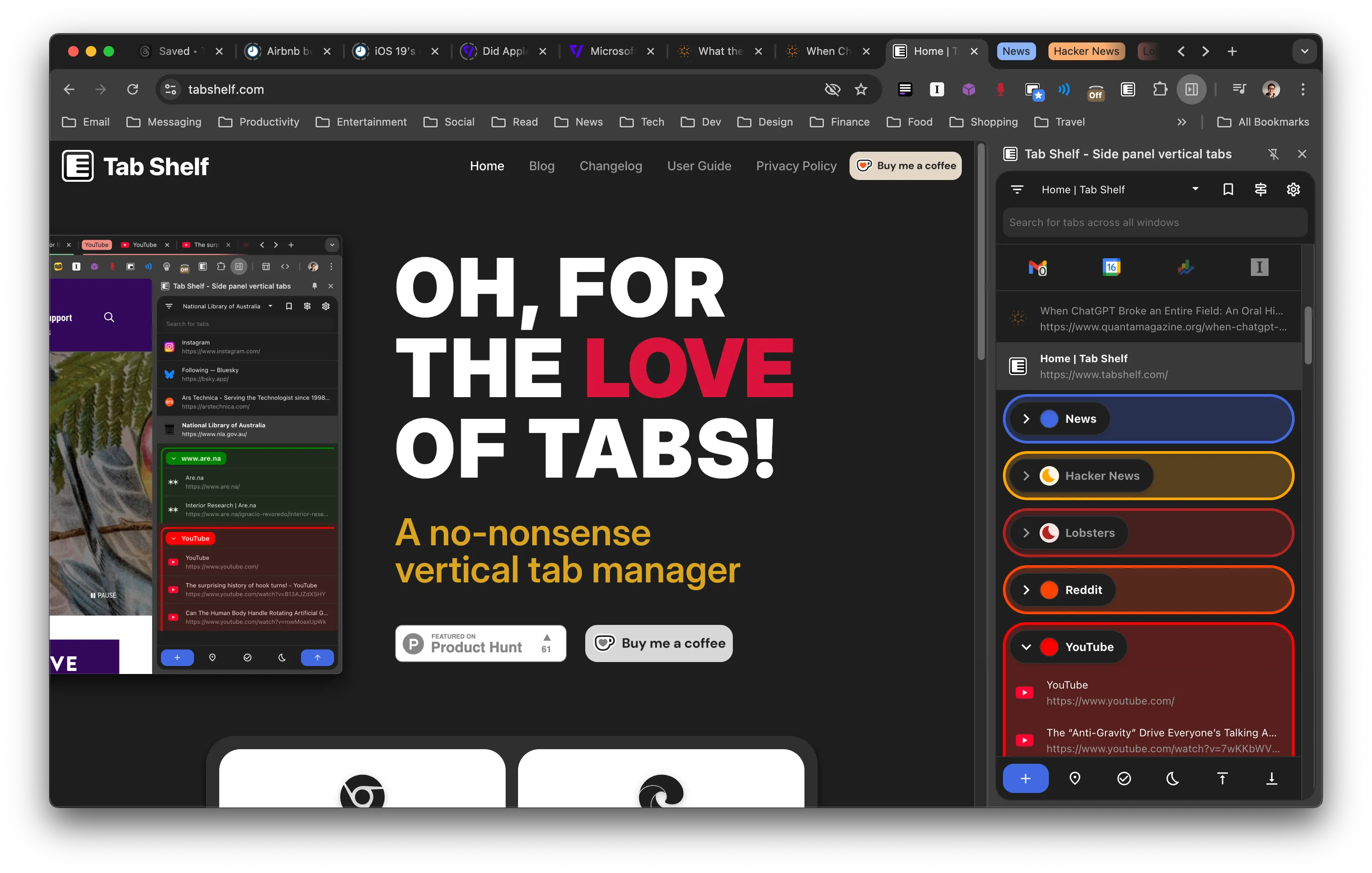
How it works
Install Tab Shelf
Available for Chrome and Edge. Add it to your browser in one click from the store.
Open the side panel
Click the Tab Shelf icon in your browser toolbar. Your tabs appear instantly in a clean vertical list.
Take control of your tabs
Organise, filter, group, and search your tabs — all without leaving the page you're on.
Features
Grouping rules
Automatically group tabs based on sites, bookmarks, regular expressions, or wildcard patterns.
Save collections
Save tab groups, windows, or your entire session to your browser bookmarks and restore them later — on any synced device.
Filter tabs
Search for your tabs by name or URL, or filter by window, site, group, or active audio.
Detect duplicate tabs
Tab Shelf flags duplicate tabs so you can spot and close them. Filter by duplicates to manage them in bulk.
Customize
Choose from 20 colours to give your tab groups — or Tab Shelf itself — a little flair.
Save resources
Sleep unused tabs, whole groups, or a custom selection to free up memory and reduce energy use.
Tab Shelf is built by one person.
Your feedback shapes what comes next — whether it's a bug, a feature idea, or just a kind word. You can also support the project by buying me a coffee on Ko-fi.